Momento – Fashion Blogger Template – Templateism Momento Blogger Template Free Download - Templateism | Momento – Fashion Blogger Template is 100% responsive, multimedia style and high quality Fashion Magazine UI Blogspot Template. It has some quality features such as Big size sliders, rotating tickers and some other custom widget functionalities have been added which make it more use friendly and professional by attracting many user’s eyes to your website. Momento Responsive Blogger Template is an ultra-fast web design having lots of premium qualities which no other fashion web design include in blogspot themes. If you are a designer or photographer then you must use this web design on your site to make your site more professional having powerful features which are easy to use and easy to navigate by everyone. Demo Download
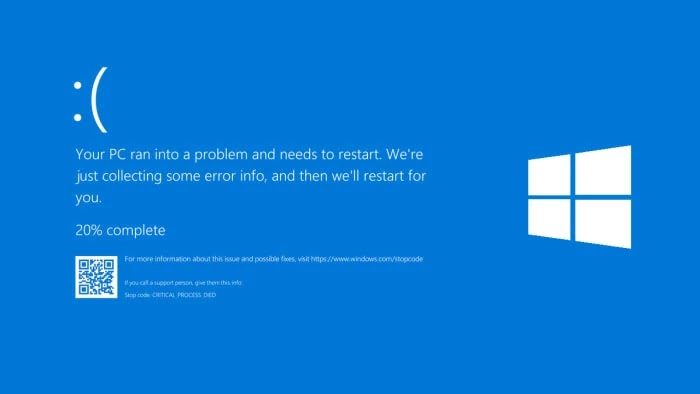
Penyebab Blue Screen pada WIndows 10
Biasanya Error Blue Screen pada Windows 10 ini terjadi karena adanya software atau hardware yang crash atau kesalahan fatal. Ada beberapa kasus juga, biasanya karena infeksi virus (malware) yang merusak informasi firmware suatu device (hardware), driver yang rusak (korup) atau install Windows kalian yang belum sempurna dan ada yang korup.
Baca juga: 10 Cara Mempercepat Booting PC di Windows 10
Karena Blue Screen ini, akibatnya membuat sistem harus di-restart, sehingga saat Windows 10 kalian mengalami error yang serius, memaksanya untuk berhenti atau macet. Kemudian tampil layar berwarna biru yang bertuliskan ERROR. Itulah yang disebut Blue Screen atau juga dikenal dengan sebutan BSOD (Blue Screen of Death).
Pada kondisi ini, Windows 10 kalian akan benar-benar berhenti total. Beda dengan hang, yang masih bisa dilakukan dengan menekan CTRL+ALT+DEL. Pada kondisi Blue Screen ini tak ada lagi yang bisa dilakukan oleh kalian. Satu-satunya cara adalah me-restart komputer atau laptop kalian. Risikonya, kehilangan data yang sedang dikerjakan.
Cara Mencegah Blue Screen pada Windows 10
Untuk mencegah terjadinya Blue Screen pada Windows 10 ini, ad acara yang bisa dilakukan. Kali ini Asaljeplak akan menunjukkan cara jitu ini. Langkah pertama yang dilakukan adalah sebagai berikut:
- Tekan tombol Windows dan S secara bersamaan. Kemudian akan muncul search di bagian kiri layar.
- Lalu ketikan services.msc di kolom search tersebut. Setelah itu tekan Enter dan akan muncul kotak yang tulisan diatasnya Services.
- Kemudian, cari tulisan àWindows Error Reporting Service. Cara mudah untuk menemukannya bisa dengan menekan huruf W terlebih dahulu pada keyboard lalu cari.
- Setelah itu klik tulisan Windows Error Reporting Service
- Langkah selanjutnya, setelah mucul kotak lalu cari Status Type. Setelan defaulfnya adalah Manual, kemudian ganti dengan Disable.
- Terakhir untuk menutup kotak tesebut, klik Apply
Nah, itulah cara ampuh untuk mencegah terjadinya Blue Screen pada Windows 10 kalian. Sebelum terjadi Blue Screen buruan lakukan tutorial dari Asaljeplak tersebut. Apabila sudah terlanjur terjadi Blue Screen pada Windows 10 kalian, sebaiknya diintal ulang saja. Tapi bisa saja melakukan uninstall driver atau program yang baru saja terinstall.
Tapi apabila Blue Screen terjadi setelah memasang hardware, sebaiknya matikan komputer lalu lepas hardware tersebut. Kemudian restart komputer. Jika blue screen bisa teratasi, cari info tentang hardware yang menyebabkan masalah tersebut dari situs pabrik pembuatnya, atau bisa saja memerlukan driver khusus.
Semoga setelah membaca artikel ini kamu tidak panik lagi dan bisa membantu memperbaiki masalah Blue Screen pada WIndows 10 yang sangat mengganggu pada saat hal tersebut terjadi.
Repost By ASALJEPLAK
Komentar
Posting Komentar